
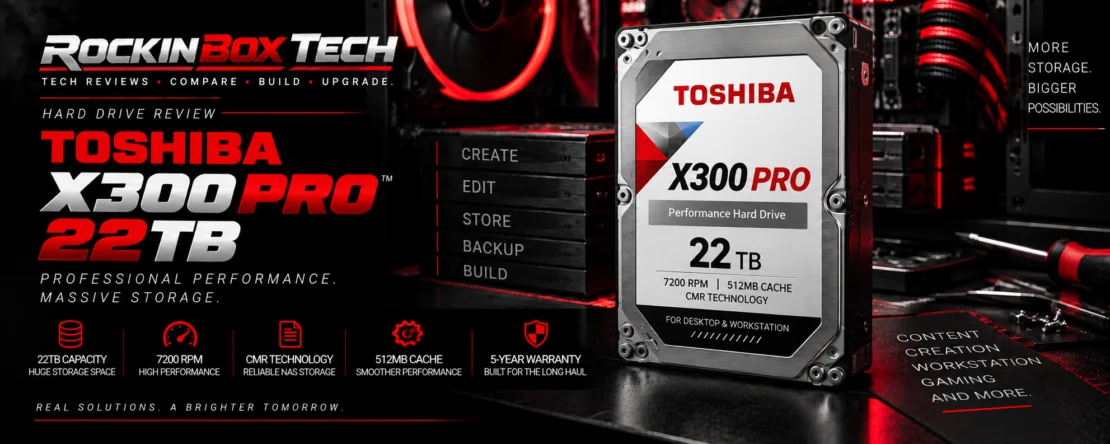
Toshiba X300 Pro 22TB
High-capacity CMR storage built for demanding desktop, workstation and professional PC environments.
Overview
The Toshiba X300 Pro 22TB sits at the high-capacity end of Toshiba's performance-oriented hard-drive family. Unlike NAS-focused models, the X300 Pro is positioned primarily for high-end desktops, workstations and professional systems that need substantial local storage capacity.
The higher-capacity X300 Pro platform combines Conventional Magnetic Recording, 7200 RPM operation and a large 512MB cache. Its workload rating and five-year warranty also place it above conventional consumer desktop HDDs intended for lighter workloads.
For content creators, workstation users and other systems generating very large datasets, the X300 Pro provides mechanical-storage density that remains difficult to match economically with large solid-state arrays.
Core Specifications
| Capacity | 22TB |
| Product Family | Toshiba X300 Pro |
| Form Factor | 3.5-inch |
| Interface | SATA 6 Gb/s |
| Recording Technology | CMR — Conventional Magnetic Recording |
| Rotational Speed | 7200 RPM |
| Cache | 512MB |
| Workload Rating | Up to 300 TB/year |
| Limited Warranty | 5 years |
| Primary Application | High-end desktop / workstation storage |
Workstation-Focused Design
Professional Storage
The X300 Pro is positioned for serious desktop and workstation systems rather than entry-level consumer storage.
High Capacity
Twenty-two terabytes can accommodate large video libraries, photography catalogs, project archives, development assets and other capacity-intensive local data.
Higher Workload Rating
The 300 TB/year workload rating gives the Pro line considerably more workload headroom than typical light-duty desktop drives.
CMR & 7200 RPM
The X300 Pro uses Conventional Magnetic Recording. CMR writes tracks independently and avoids the overlapping-track behavior used by Shingled Magnetic Recording drives.
For workstation workloads involving sustained writes, large files and frequent data movement, CMR is generally the more appropriate mechanical-storage architecture.
The 7200 RPM spindle speed also places the X300 Pro in the performance-oriented HDD category rather than the slower 5400 RPM class commonly found in some capacity-focused desktop drives.
512MB Cache
Higher-capacity X300 Pro models use a 512MB DRAM cache. That provides a substantial buffer for small writes and helps the drive manage incoming data efficiently.
Independent testing of earlier high-capacity X300 Pro models found the larger cache and overall platform capable of competitive mechanical-drive performance, although workload type and exact capacity affect results. :contentReference[oaicite:1]{index=1}
Independent Testing Perspective
Published testing of the X300 Pro 12TB and 20TB models found the family to be a solid workstation performer, with particularly strong results in some sustained workloads. The tested 20TB model achieved roughly 100 MB/s in Tom's Hardware's mixed-file DiskBench copy test, while sustained-write testing placed high-capacity HDDs in a much faster approximately 250–290 MB/s range depending on model and workload. :contentReference[oaicite:2]{index=2}
Those results demonstrate an important HDD characteristic: performance varies considerably with workload. Large sequential transfers can be much faster than workloads involving thousands of smaller files.
X300 Pro vs NAS Drives
X300 Pro
Intended primarily for high-end desktops and workstations where large capacity, sustained performance and professional workloads are the priorities.
NAS-Focused HDDs
Drives such as Toshiba's N300 Pro are designed specifically for multi-drive NAS environments and include firmware and platform considerations targeted toward those systems.
Independent analysis has found the X300 Pro and N300 Pro closely related in performance characteristics, but their intended environments differ. The X300 Pro is the more natural fit when the target system is a workstation or high-end desktop rather than a multi-bay NAS. :contentReference[oaicite:3]{index=3}
Best Uses
Content Creation
Large video footage collections, raw photography, audio projects and completed production assets can consume terabytes quickly.
Professional Workstations
Useful as high-capacity local storage alongside faster NVMe drives used for the operating system, applications and active project files.
Large Archives
Twenty-two terabytes provides substantial space for local archives, installers, project history and other datasets that need to remain readily accessible.
SSD + HDD Strategy
Even a performance-oriented 7200 RPM HDD cannot approach the random access latency of modern NVMe storage. For a professional workstation, a mixed-storage configuration is often the most practical arrangement.
NVMe SSD
Use solid-state storage for Windows, applications, scratch space and active projects that benefit directly from extremely low latency and high throughput.
X300 Pro HDD
Use the X300 Pro for high-capacity local files, completed projects, source material, large libraries and other data where storage density matters more than SSD-class responsiveness.
Noise, Vibration & Cooling
The X300 Pro is a high-capacity 7200 RPM mechanical drive. Users should expect audible seeks, rotational noise and some vibration, particularly compared with completely silent solid-state storage.
Proper mounting and case airflow are important in workstation builds, especially when several high-capacity hard drives are installed together. Cases with isolated or damped 3.5-inch mounting can also reduce the amount of vibration transferred into the chassis.
Owner & Community Perspective
The X300 Pro's appeal centers on high storage density, CMR recording, workstation positioning and its stronger five-year warranty compared with Toshiba's standard X300 line. Independent reviewers have likewise identified the Pro version as the more serious option when additional capacity and reliability coverage are priorities. :contentReference[oaicite:4]{index=4}
A recurring consideration with high-capacity mechanical storage is acoustics. Users moving from SSD-only systems should expect the normal mechanical sounds associated with a 7200 RPM HDD.
Strengths & Limitations
Strengths
- Very large 22TB capacity
- CMR recording technology
- 7200 RPM performance class
- Large 512MB cache
- 300 TB/year workload rating
- Five-year limited warranty
- Designed specifically for high-end desktop and workstation use
- Strong companion to NVMe storage in capacity-heavy systems
Limitations
- Mechanical access latency remains far behind SSDs
- 7200 RPM operation produces audible mechanical noise
- Requires a full-size 3.5-inch drive bay
- Not specifically optimized for multi-bay NAS environments
- Exact 22TB independent benchmark coverage remains limited
- Large single-drive capacity makes a separate backup especially important
Works Best With
Professional Workstations
Systems used for video, photography, development, design and other workloads that generate large amounts of local data.
Fast NVMe Storage
Pairing the X300 Pro with an NVMe SSD provides both responsive active storage and very large local capacity.
Independent Backup
Critical files should exist on another drive, NAS, external backup or other independent storage system. Capacity is not redundancy.
Rockin Box Tech Summary
The Toshiba X300 Pro 22TB fills a different role from mainstream desktop drives. It is designed for users who need workstation-class storage capacity without moving to a dedicated NAS or enterprise storage platform.
Its combination of 22TB capacity, CMR recording, 7200 RPM operation, 512MB cache, a 300 TB/year workload rating and five-year warranty makes the X300 Pro particularly relevant to content creators, professional workstations and other capacity-intensive desktop systems.
It should still be viewed as complementary to SSD storage rather than a replacement for it. A fast NVMe drive for active workloads paired with an X300 Pro for large local datasets provides a more balanced workstation-storage configuration.
Because independent testing of the newer 22TB capacity is less extensive than testing of earlier X300 Pro models, buyers should prioritize exact-model specifications and current pricing rather than assuming benchmark results from another capacity transfer directly to this drive.