
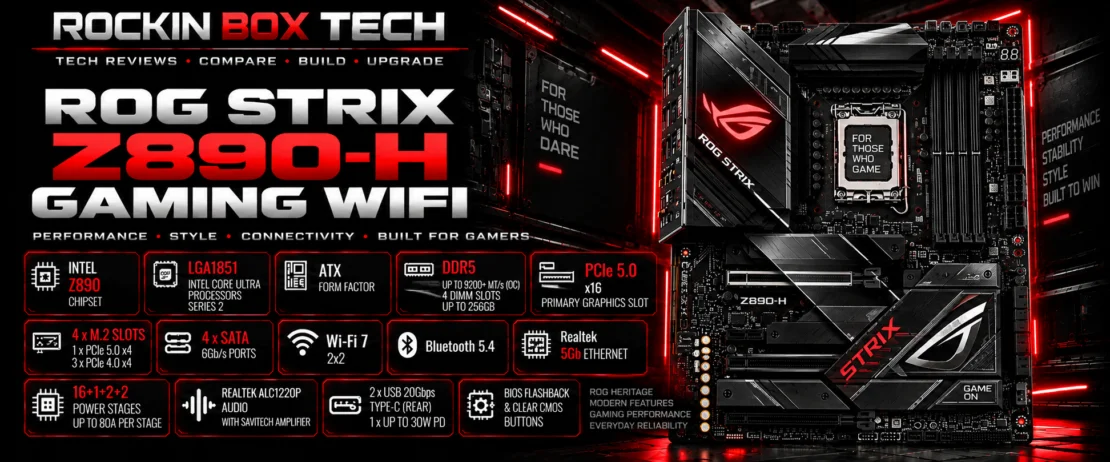
ASUS ROG STRIX Z890-H GAMING WIFI
Intel Z890 ATX gaming motherboard for Core Ultra Series 2 processors with DDR5, PCIe 5.0, four M.2 slots, Wi-Fi 7, 5Gb Ethernet and high-speed USB connectivity.
Quick Product Overview
The ASUS ROG STRIX Z890-H GAMING WIFI is an ATX motherboard based on Intel's Z890 chipset and LGA1851 socket for Intel Core Ultra Series 2 desktop processors.
It combines DDR5 memory support, a CPU-connected PCIe 5.0 x16 graphics slot, four onboard M.2 positions, Wi-Fi 7 and Realtek 5Gb Ethernet. ASUS also equips the board with substantial VRM and M.2 cooling plus its current generation of builder-friendly Q-Design features.
Within ASUS's ROG Strix Z890 family, the Z890-H provides many of the features expected from a performance gaming platform while using a less elaborate connectivity package than some higher-tier models.
Key Specifications
| Manufacturer | ASUS |
|---|---|
| Model | ROG STRIX Z890-H GAMING WIFI |
| Chipset | Intel Z890 |
| CPU Socket | LGA1851 |
| Processor Support | Intel Core Ultra Series 2 desktop processors |
| Form Factor | ATX — 12 × 9.6 in / 30.5 × 24.4 cm |
| Memory | 4 × DDR5 DIMM slots |
| Maximum Memory | Up to 256GB |
| Memory Speed | Up to DDR5-9066+ MT/s (OC), configuration dependent |
| Memory Profiles | Intel XMP, ASUS AEMP III, DIMM Flex |
| Primary Graphics Slot | 1 × PCIe 5.0 x16 |
| Additional Expansion | 2 × PCIe 4.0 x16 physical slots operating up to x4 |
| M.2 Storage | 4 × onboard M.2 slots |
| PCIe 5.0 M.2 | 1 × CPU-connected PCIe 5.0 x4 M.2 slot |
| SATA | 4 × SATA 6Gb/s ports |
| Wireless | 2×2 Wi-Fi 7 |
| Bluetooth | Bluetooth 5.4 |
| Wired Networking | Realtek 5Gb Ethernet |
| Rear USB | 10 ports including 2 × USB 20Gbps Type-C |
| USB Power Delivery | Rear USB Type-C with up to 30W PD Fast-charge |
| Audio | Realtek ALC1220P with Savitech SV3H712 amplifier |
| Power Stages | 16+1+2+2, rated up to 80A per stage |
| Firmware Controls | BIOS FlashBack and Clear CMOS buttons |
Performance & Use-Case Information
Gaming Systems
The CPU-connected PCIe 5.0 x16 slot, DDR5 platform and high-speed storage support provide a strong foundation for performance gaming PCs.
Core Ultra Builds
LGA1851 and Intel Z890 provide the platform required for compatible Intel Core Ultra Series 2 desktop processors.
Fast NVMe Storage
Four M.2 positions include a CPU-connected PCIe 5.0 x4 slot for current high-bandwidth NVMe solid-state drives.
High-Speed Networking
Realtek 5Gb Ethernet provides significantly more wired bandwidth than traditional Gigabit Ethernet when used with compatible network equipment.
Current Wireless
Integrated 2×2 Wi-Fi 7 provides modern wireless connectivity across supported 2.4GHz, 5GHz and 6GHz bands.
High-Speed USB
Rear USB connectivity includes two 20Gbps Type-C ports, with one supporting up to 30W USB Power Delivery fast charging.
Power Delivery & Cooling
ASUS specifies a 16+1+2+2 power-stage design rated for up to 80A per stage. ProCool II CPU power connectors and substantial VRM heatsinks support the board's processor power-delivery system.
Cooling hardware includes a VRM heatsink array, chipset heatsink and heatsinks for all four M.2 positions. ASUS also provides dedicated CPU fan, CPU optional fan and AIO pump headers plus five chassis-fan headers.
This cooling layout is designed to provide system builders with multiple options for air-cooled and liquid-cooled configurations.
Platform & Compatibility
LGA1851
The board uses Intel's LGA1851 socket for compatible Core Ultra Series 2 desktop processors. LGA1700 desktop processors cannot be installed.
Intel Z890
Intel's Z890 chipset provides the motherboard's current-generation platform, storage and expansion foundation.
DDR5 Only
Four DIMM slots support up to 256GB of DDR5 memory. DDR4 modules are not compatible with the motherboard.
ATX Chassis
The 12 × 9.6-inch board requires a computer chassis supporting the standard ATX form factor.
Works Best With
Intel Core Ultra Series 2
A compatible LGA1851 Core Ultra desktop processor is required. CPU selection should be matched to the system's intended gaming, productivity or creator workload.
Intel XMP DDR5
A matched DDR5 memory kit from ASUS's compatibility list provides the most predictable route to higher memory speeds and XMP operation.
High-Performance GPU
The reinforced CPU-connected PCIe 5.0 x16 SafeSlot provides the primary interface for a discrete gaming or workstation graphics card.
Storage, Networking & Connectivity
4 M.2 Slots
Four onboard M.2 positions provide room for multiple NVMe drives, with heatsinking supplied for each storage position.
PCIe 5.0 NVMe
The primary CPU-connected M.2 position supports PCIe 5.0 x4 storage devices and drives up to the 22110 form factor.
4 SATA Ports
Four SATA 6Gb/s connections support compatible SATA solid-state drives, hard drives and other SATA storage devices.
5Gb Ethernet
The onboard Realtek controller provides a 5Gb wired network connection with ASUS LANGuard.
Wi-Fi 7
Integrated 2×2 Wi-Fi 7 supports 2.4GHz, 5GHz and 6GHz operation, subject to operating-system and regional support.
USB 20Gbps
Two rear USB 20Gbps Type-C connections provide high-speed peripheral support, including one port with up to 30W PD fast charging.
Audio & Builder Features
SupremeFX Audio
The onboard audio system uses a Realtek ALC1220P codec with SupremeFX shielding and premium audio components.
Savitech Amplifier
A Savitech SV3H712 amplifier supports the motherboard's integrated headphone and speaker audio hardware.
BIOS FlashBack
A rear BIOS FlashBack button provides a dedicated method for firmware updating and recovery.
Clear CMOS
A rear Clear CMOS button makes firmware-setting recovery more accessible during system configuration and troubleshooting.
M.2 Q-Design
ASUS provides Q-Latch, Q-Release and Q-Slide features intended to simplify M.2 drive installation and removal.
PCIe Q-Release Slim
ASUS's PCIe release mechanism is intended to simplify removal of large graphics cards from the reinforced primary slot.
What Published Technical Information Shows
Performance-Oriented Platform
The combination of Z890, LGA1851, DDR5 and PCIe 5.0 places the board squarely within Intel's current performance desktop platform.
Strong Networking
The combination of Wi-Fi 7 and 5Gb Ethernet provides considerably more networking capability than boards limited to Wi-Fi 6 and Gigabit Ethernet.
Four-Drive M.2 Capacity
Four onboard M.2 positions provide substantial solid-state storage capacity for gaming and general performance systems.
PCIe 5.0 Storage
One CPU-connected PCIe 5.0 x4 M.2 position provides support for current high-bandwidth NVMe drives.
Substantial Power Hardware
The 16+1+2+2 power-stage arrangement and large VRM heatsinks provide the board with a substantial processor power-delivery platform.
Builder Convenience
BIOS FlashBack, Clear CMOS and ASUS Q-Design features address common installation, upgrade and troubleshooting tasks.
Where Research Agrees & Differs
Documented Hardware
ASUS documentation clearly establishes the board's Z890 chipset, LGA1851 socket, DDR5 support, PCIe 5.0 graphics and storage, Wi-Fi 7, 5Gb Ethernet and four-M.2 configuration.
Results Depend on Configuration
Maximum memory speed, processor performance, temperatures and storage behavior vary according to CPU, memory, BIOS, cooling and installed expansion hardware.
Strengths & Limitations
Strengths
- Intel Z890 / LGA1851 platform
- Up to 256GB DDR5
- PCIe 5.0 x16 primary graphics slot
- Four onboard M.2 positions
- PCIe 5.0 x4 NVMe support
- Realtek 5Gb Ethernet
- 2×2 Wi-Fi 7
- Two rear USB 20Gbps Type-C ports
- Up to 30W USB PD fast charging
- ALC1220P SupremeFX audio
- BIOS FlashBack and Clear CMOS
Limitations
- Requires an LGA1851 processor
- LGA1700 processors are incompatible
- DDR4 memory cannot be reused
- No rear Thunderbolt 4 ports listed by ASUS
- Only one M.2 position operates at PCIe 5.0 x4
- Maximum DDR5 speeds are configuration dependent
- Wi-Fi 7 features depend on OS and network support
Upgrade Considerations
Moving from LGA1700
An upgrade from an older Intel LGA1700 system requires a compatible LGA1851 processor and may require verification of CPU cooler mounting compatibility.
DDR5 Required
Existing DDR4 modules cannot be installed. Builders moving from a DDR4 system will need a compatible DDR5 memory kit.
Network Hardware
Obtaining the full benefit of 5Gb Ethernet or Wi-Fi 7 requires compatible routers, switches, access points or other network hardware.
Alternatives to Consider
ASUS ROG STRIX Z890-E GAMING WIFI
A higher-tier ASUS Z890 option with a broader storage and premium connectivity feature set.
MSI MPG Z890 CARBON WIFI
An enthusiast-oriented Z890 alternative combining DDR5, PCIe 5.0, Wi-Fi 7 and extensive onboard connectivity.
Gigabyte Z890 AORUS MASTER
A premium Z890 alternative emphasizing extensive expansion, high-speed networking and enthusiast-class hardware.
Who Is It Best For?
Performance Gaming PCs
Core Ultra gaming systems using a discrete GPU, DDR5 memory and high-speed NVMe storage.
Fast Networked Systems
Builders who can make practical use of 5Gb Ethernet or current Wi-Fi 7 wireless networking.
ROG-Focused Builds
Users wanting ASUS ROG software, cooling controls, DIY features and the Strix design ecosystem on Intel's Z890 platform.
Rockin Box Tech Research Summary
The ASUS ROG STRIX Z890-H GAMING WIFI combines Intel's Z890 / LGA1851 platform with a feature set focused strongly on performance gaming and modern connectivity.
Its documented hardware includes four DDR5 DIMM slots, PCIe 5.0 x16 graphics, four M.2 positions, one PCIe 5.0 x4 M.2 slot, Wi-Fi 7, Realtek 5Gb Ethernet and high-speed USB 20Gbps connectivity.
The board also includes ASUS builder-focused features such as BIOS FlashBack, Clear CMOS, M.2 Q-Release hardware and PCIe Slot Q-Release Slim, along with substantial VRM and M.2 cooling.
Builders should verify processor support, DDR5 compatibility, cooler mounting and storage/expansion requirements before finalizing an LGA1851 system.
Research Sources
ASUS / Republic of Gamers
Official ROG STRIX Z890-H GAMING WIFI specifications, product documentation, processor support information, memory specifications, storage layout, networking, USB, audio and motherboard features.
Published Technical Information
Manufacturer documentation and published technical material are used to place specifications in practical system-building context without representing the information as hands-on Rockin Box Tech testing.